TEAM, INSIGHTS AND MORE
Your team, and more than one restaurant
Give staff their own login, and switch between locations with one account.
Invite your team
- Switch on “Team accounts” under Settings → Features (Starter: up to 5 accounts, Premium: unlimited).
- Under Settings → Team, enter a name and email address and choose Invite.
- The invitation link is valid for 7 days. Already use Tafels elsewhere? Tick “I already have a Tafels account” and sign in with that password.
Staff run service: bookings, the waitlist, the floor plan and gift cards. Only owners change settings, billing and the team.
More restaurants
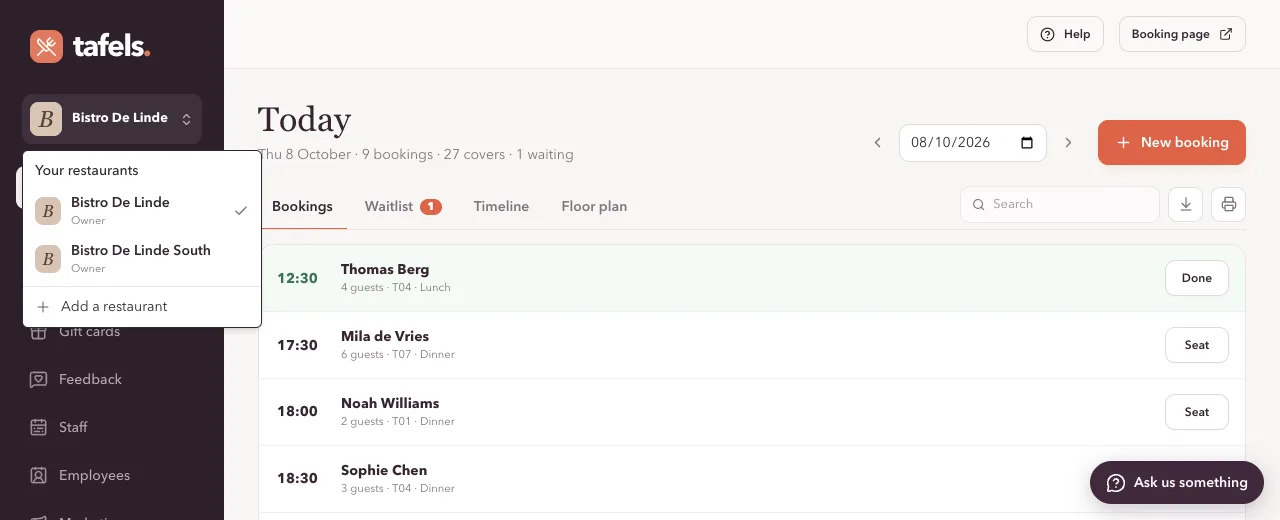
Click your restaurant’s name at the top of the menu to see every restaurant you belong to, and switch with one click. Choose “Add a restaurant” for another location: it gets its own tables, tickets, team and plan, and starts its own free trial.
Staff who work at two of your locations need only one login: invite the same email address from both.