TEAM, INSIGHTS AND MORE
Results, audiences and tags
See what a campaign did, and send to exactly the right guests with tags and audiences.
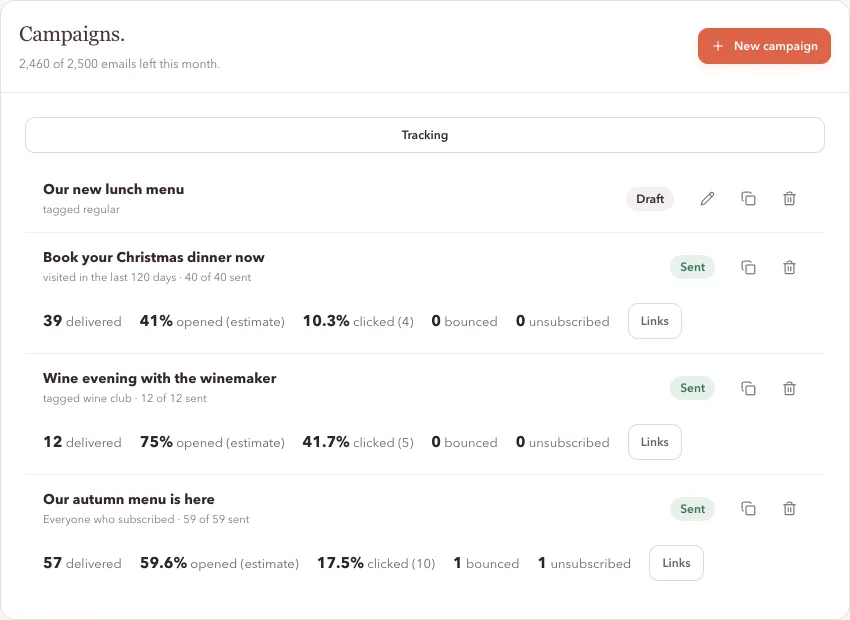
What a campaign did
- Open Marketing → Campaigns. Each sent campaign shows how many emails were sent and delivered, how many people clicked and which links were clicked most.
- Opens are an estimate: many mail apps load the invisible picture by themselves. Clicks are more reliable.
- Under Tracking you choose whether Tafels counts opens and clicks. Turn on opens only when your privacy statement says you do this.
- People who unsubscribe from a campaign are counted for that campaign, and are never emailed again.
Tags
- Open Marketing → Contacts. Select one or more people and press Add tags, or open a contact and press Edit tags.
- Give a tag a short name, such as wine club, birthday or regular. Tags are lower case and are kept per restaurant.
- Use the filter above the list to find everyone with a tag, then export the list if you need it.
Audiences
- Under Who gets it you combine filters: tags (has one of these, has none of these), visits (at least a number), last visit (within or not within the last number of days), VIPs, language and where they signed up.
- The audience shows how many people it matches before you send. With nobody in it, there is nothing to send and Tafels says so.
- Only guests who agreed to hear from you can be in an audience, whatever you choose.
Start small: a campaign to your regulars with a personal offer beats a message to everyone.