RUNNING SERVICE
Running service with the Today screen
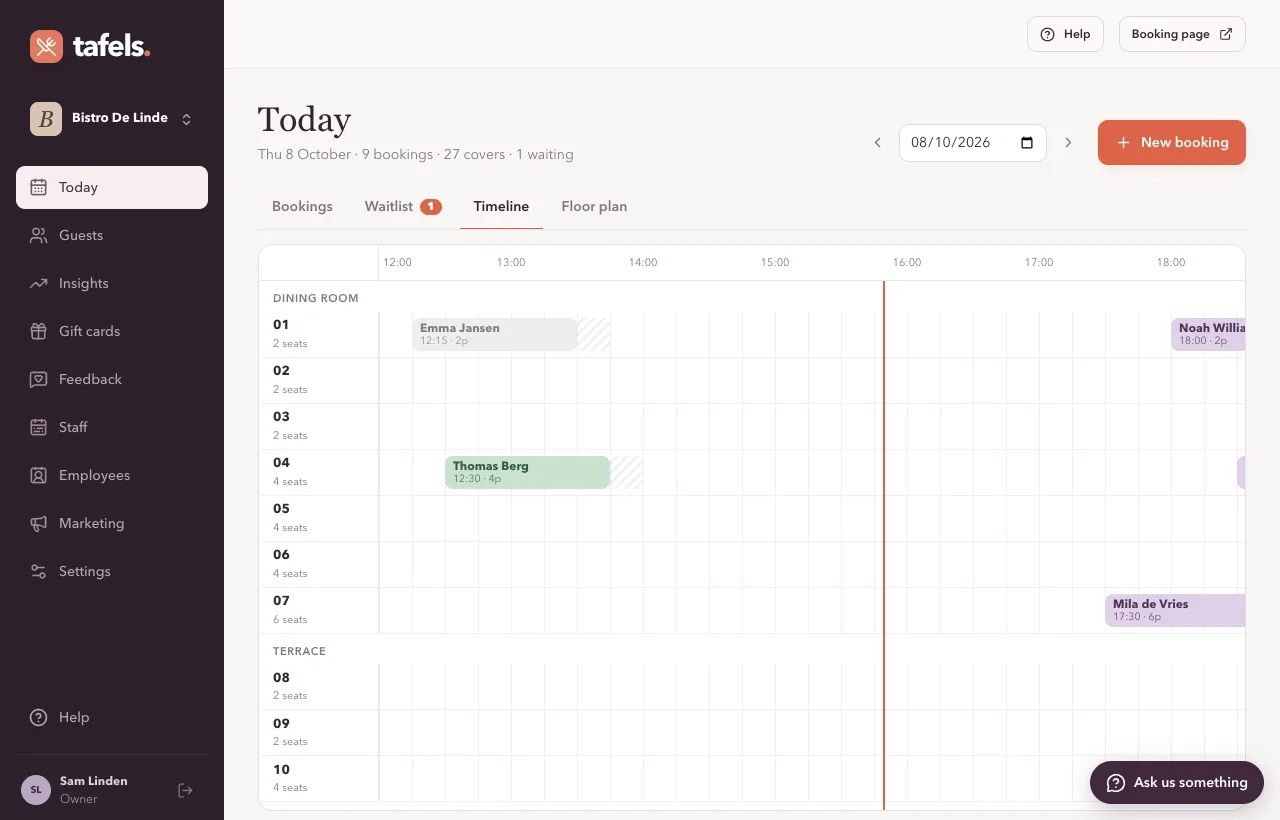
The day’s bookings in time order, a timeline per table, the floor plan and the waitlist.
Today is the screen you keep open during service. It has four views, switched with the tabs at the top.
The four views
- Bookings: every booking in time order, with one button for the next step: Seat when guests arrive, Done when they leave.
- Waitlist: walk-ins and guests waiting for a table. Seat them as soon as a table frees up.
- Timeline: one row per table with time running across, so you see at a glance where there’s room. The striped part after a booking is the changeover buffer.
- Floor plan: your tables per room at a chosen time: free, booked or seated.
Handy during service
- Click an empty spot on the timeline, or a free table on the floor plan, to book that table at that time.
- Tap a booking for the guest’s details, notes, visit history, payment and voucher code.
- Walk-ins and phone bookings go through New booking. Staff can also book outside the online times.
- The screen refreshes itself every 30 seconds, so online bookings appear without reloading.
Marking guests as seated and done keeps your numbers right, and is what triggers the review email after the visit.